Introduction
Connecting Tourbiz to Airbnb Experiences lets you sell your activities on Airbnb while managing availability, capacity and bookings from Tourbiz.
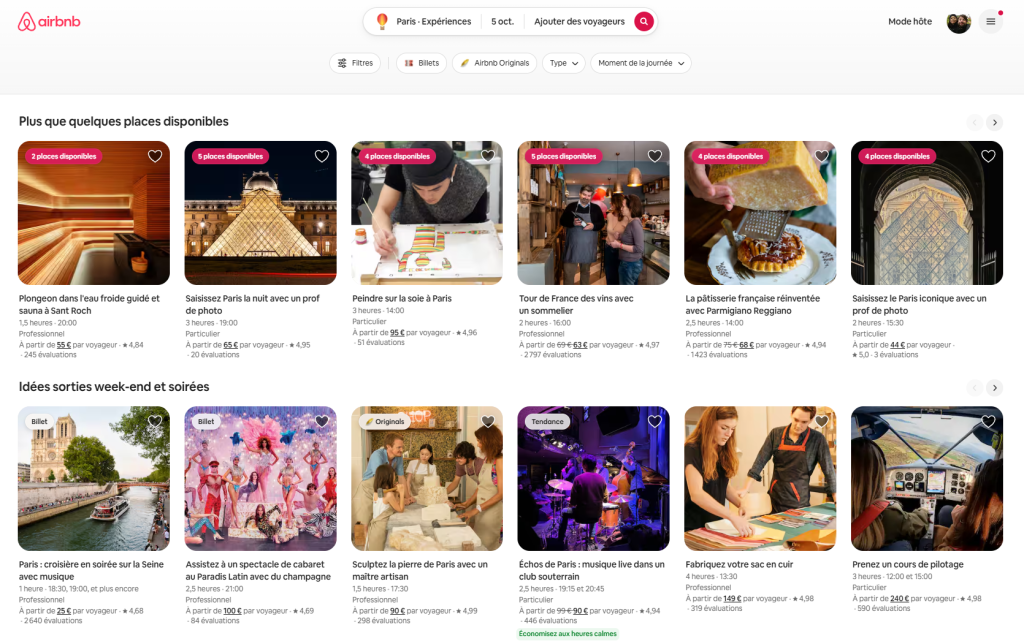
Airbnb Experiences offers activities hosted by local experts, sold on a marketplace present in more than 220 countries and regions. Once the connection is set up:
- travellers see your real-time availability and prices on Airbnb;
- each Airbnb booking is automatically created in Tourbiz;
- stock is updated on all your connected channels, which limits overbooking.
Division of roles: the experience content (title, photos, description, policies) is still managed in Airbnb. Tourbiz handles the operational side (time slots, capacity, prices, bookings).
Prerequisites before you start
Check these four points before starting the connection: most mapping failures come from a missing prerequisite.
1. A validated Airbnb Host account
- You must be the main Host of the account: a co-host cannot connect Tourbiz.
- Your account must have been accepted as an Experiences host.
- If you are already a host, your listings must have been migrated to the new Airbnb Experiences platform. Check the pending tasks in your Host dashboard.
2. New to Airbnb: qualification
New operators first fill in the Airbnb qualification form, then wait for validation by email. Airbnb asks in particular for:
- a rating of 4.8 or higher on other platforms;
- 15 participants maximum per session;
- a fully guided experience;
- a duration of 12 hours maximum.
3. At least one experience ready in Airbnb
The experience must be fully set up in Airbnb (not a draft), with the status Published or Ready to publish. Tourbiz does not create the Airbnb content.
4. A compatible setup
| Setting | Airbnb requirement |
|---|---|
| Activity type | Experience only (Services are not supported) |
| Group type | Public group or private group, never both |
| External calendars | No external calendar connected to the experience |
| Price categories | Adult, Child, Infant only; the ages are those set in each Tourbiz product |
| Time zone | Identical between the Airbnb account and the Tourbiz account |
| Duration | Filled in on Airbnb |
| Start time | Fixed time required, on a multiple of 5 or 15 minutes (e.g. 10:00, 10:15) |
| Booking lead time | Airbnb advance notice aligned with the sales cut-off time in Tourbiz |
Connect your Tourbiz account to Airbnb
The connection is done in two stages: you create the Airbnb OTA connection in Tourbiz, then link your Airbnb Host account to it.
Step 1: create the Airbnb OTA connection
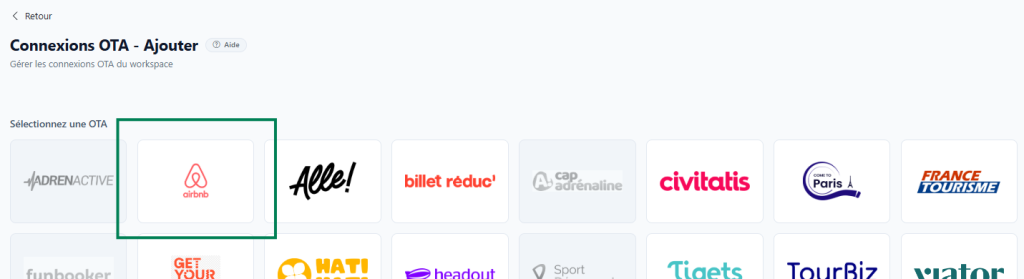
- In the left-hand menu, open Channel manager > OTA connections.
- Click Add, at the top right.

- In the “Select an OTA” list, click the Airbnb tile.
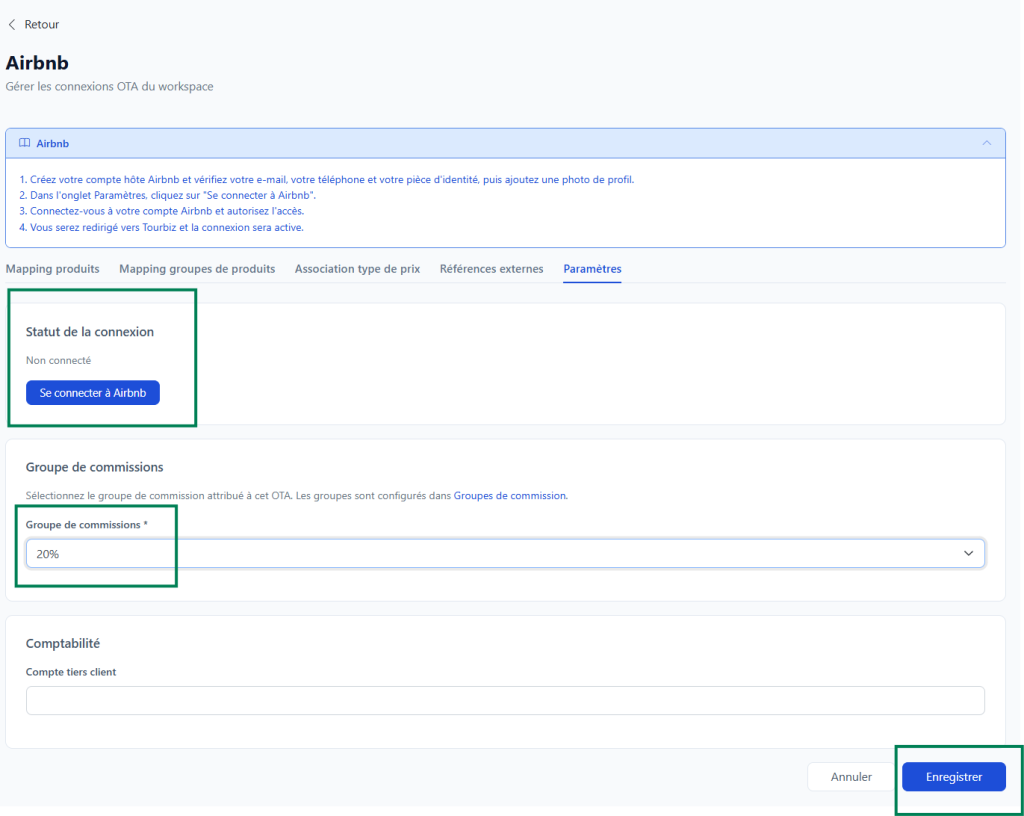
- Choose the Commission group assigned to Airbnb in the drop-down list. Groups are created beforehand in Commission groups.
- Click Save. The Airbnb Ireland UC connection appears in your OTA connections.

Step 2: connect your Airbnb Host account
Before you start, check that your Airbnb Host account is complete: email, phone and ID verified, profile photo added.
- In the Airbnb connection, open the Settings tab. The connection status shows “Not connected”.
- Click Connect to Airbnb. You are redirected to the Airbnb website.
- Log in to your Airbnb Host account (this step is skipped if you are already logged in).
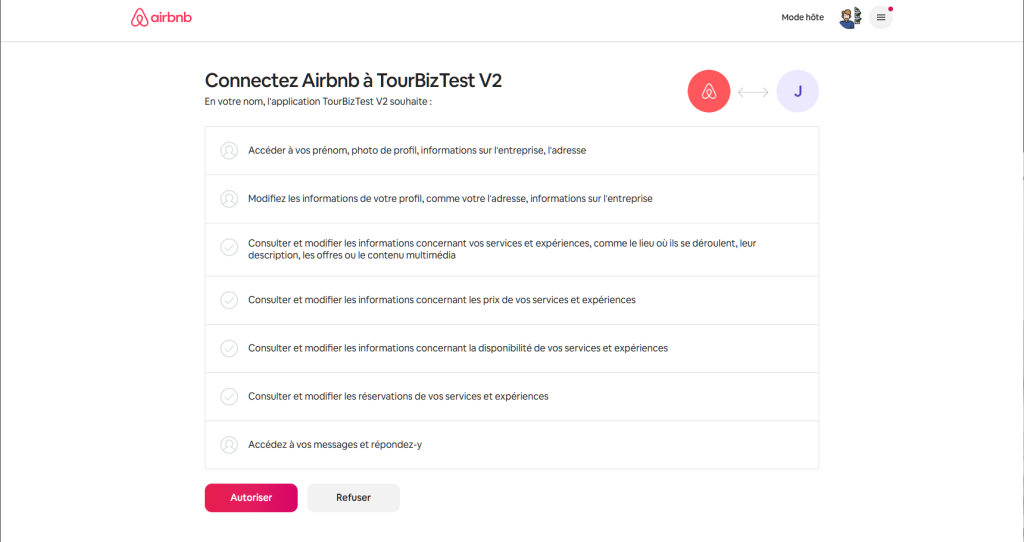
- Airbnb lists the permissions requested by Tourbiz: profile, experiences, prices, availability, bookings and messages. Click Allow.
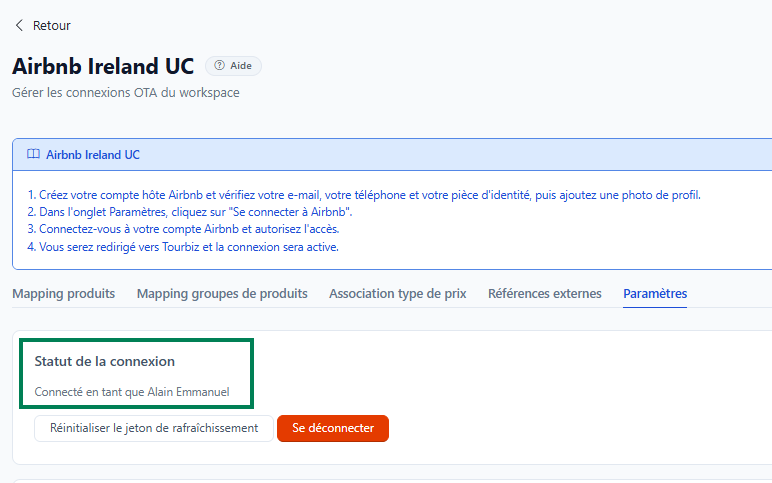
- You are automatically taken back to Tourbiz. The message “The Airbnb host has been connected successfully” appears and the status shows the name of the connected Host account.
Manage the connection
Everything happens in the Settings tab of the Airbnb connection:
- Connection status: shows whether a Host account is connected, and which one.
- Disconnect: cuts the link between Tourbiz and your Airbnb Host account.
- Reset the refresh token: restarts the authorisation if synchronisation no longer works.
- Commission group: can be changed at any time, then Save.
If no experience appears after connecting, check that you are connected to the right Host account, that your experiences are not drafts and that your account’s time zone is set.
Link your products to Airbnb experiences
Once the account is connected, three tabs of the Airbnb connection are used to link your products: Price type mapping, Product mapping and External references.
Each Airbnb activity is linked to a single Tourbiz product. If a product offers several options, create one Airbnb activity per option.
Step 1: map the price types
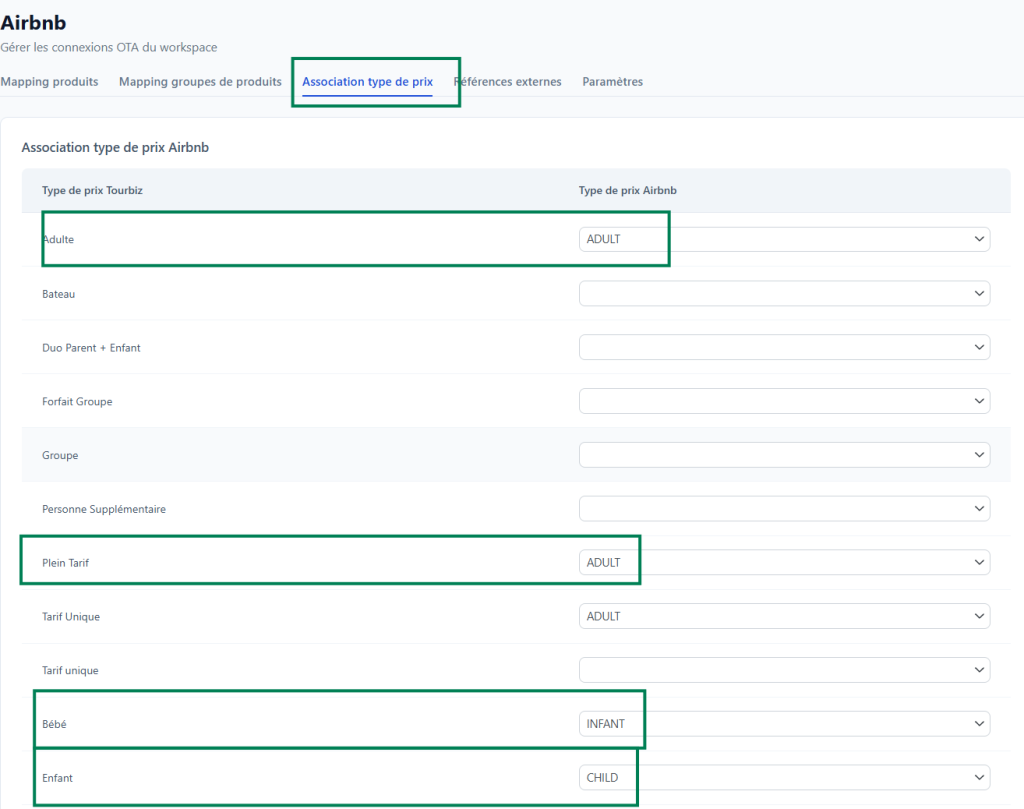
In the Price type mapping tab, map each of your Tourbiz price types to an Airbnb price type. Airbnb currently only accepts three types:
| Tourbiz price type (example) | Airbnb price type |
|---|---|
| Full price | ADULT (adult) |
| Child rate | CHILD (child) |
| Infant rate | INFANT (infant) |
Age brackets are not set here: Tourbiz sends Airbnb the ages set in each product’s configuration.
Step 2: allow products for sale
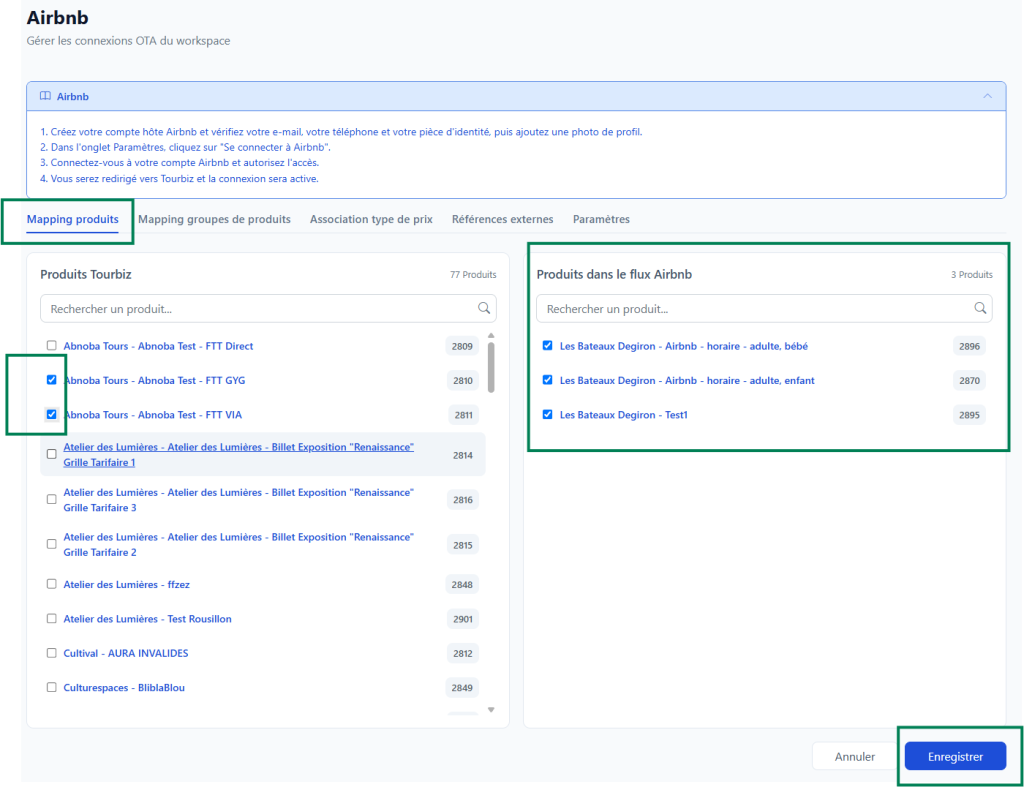
In the Product mapping tab, allow for sale on Airbnb the Tourbiz products you want to distribute there.
Step 3: link Airbnb activities to your products
In the External references tab:
- In the Airbnb Ireland UC external references block, choose for each Tourbiz product the matching Airbnb activity in the drop-down list, then click Save.
- In the Airbnb activity connection block, enable the connection of each activity. Its status changes to “Connected”.
- Click Synchronise with Airbnb to send Tourbiz times and availability to Airbnb.
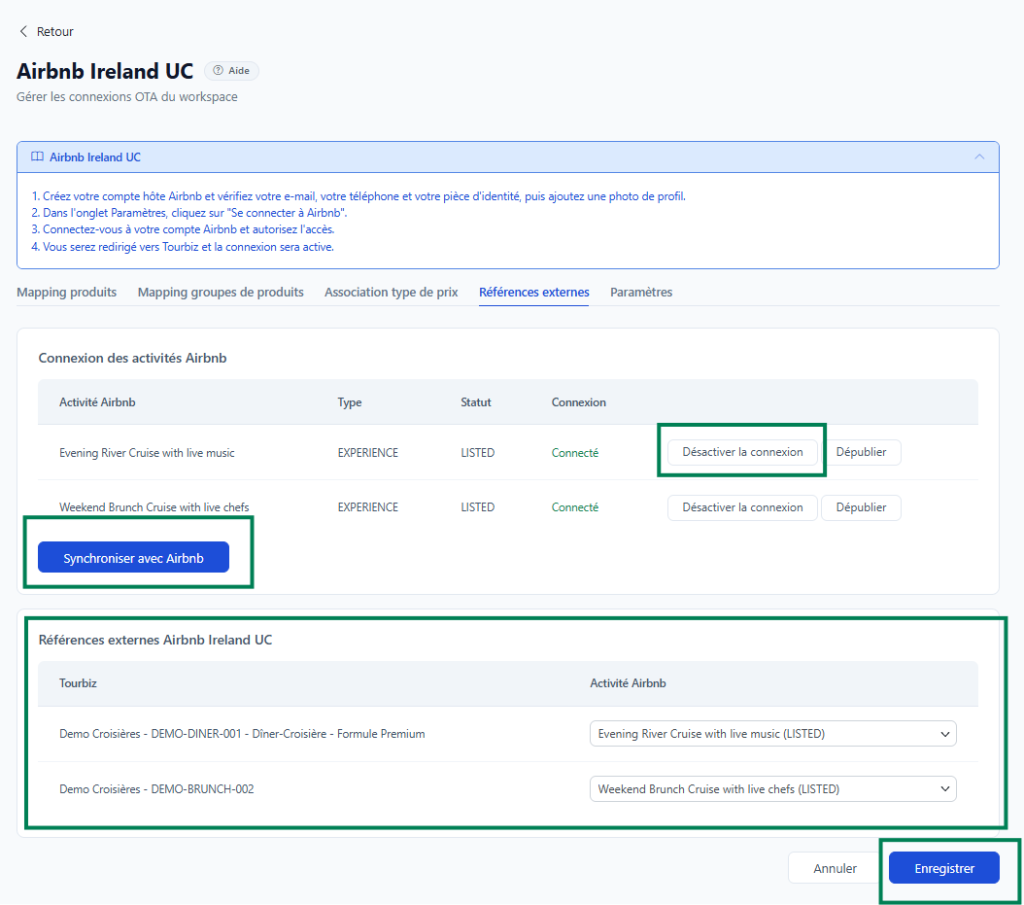
For each Airbnb activity, the table shows:
| Column or button | Role |
|---|---|
| Type | EXPERIENCE (only supported type) |
| Status | Status of the listing on Airbnb, for example LISTED (published) |
| Connection | Connected to Tourbiz or not |
| Disable the connection | Cuts the link between the Airbnb activity and Tourbiz |
| Unpublish | Removes the listing from Airbnb |
After mapping, make a test booking to check the time zone, currency, prices and how the booking appears in Tourbiz.
Availability, rates and bookings
Once the product is linked, Tourbiz becomes the source of truth: availability is no longer managed in Airbnb.
Availability and capacity
- Airbnb availability is replaced by Tourbiz availability, and every change made in Tourbiz is sent automatically.
- Maximum capacity per time slot: 250 places (activation on the Airbnb side required beyond the standard).
- The end time is set once for the experience in Airbnb, not per time slot.
Rates
- Only the price per person is sent; tiered or volume rates are not sent.
- Airbnb only allows the Adult price to be changed per time slot. Child and Infant prices are set at experience level.
- The Adult price of a time slot can no longer change once an Airbnb booking exists on that slot.
- The default price in Airbnb must be lower than or equal to the lowest price in Tourbiz.
- Discounts set up on the product can block price updates.
Bookings
| Airbnb event | What happens in Tourbiz |
|---|---|
| New booking | Created automatically, with the customer’s first and last name; stock is decreased on all channels |
| Change | Cancellation of the original booking + new booking, with the same partner reference |
| Cancellation | Carried out by Airbnb without asking for approval, then notified to Tourbiz; an email alerts you if it fails |
| Booking made before the connection | Remains managed in Airbnb only |
Common issues
| Issue | Solution |
|---|---|
| No experience appears in Tourbiz | Check the Host account used, the experience status (not a draft) and the account’s time zone |
| The product cannot be connected | The experience accepts both public and private groups: choose one of them in Airbnb |
| Time slots do not show up on Airbnb | Check that they have a fixed start time, aligned on a multiple of 5 minutes |
| All dates are “full” on Airbnb | Align the Airbnb advance notice with the Tourbiz sales cut-off time |
| Message “Set a price per guest of at least €X” | Lower the default price in Airbnb below the minimum Tourbiz price |
| Prices are not updated | Remove the product’s discounts; check that no booking already exists on the slot |
| Synchronisation failure | Enter a valid duration in Airbnb |
| Child ages badly synchronised | Check the ages in the Tourbiz product configuration and the price type mapping |
Best practices
- Manage availability in Tourbiz only.
- Keep products simple: one option = one Airbnb experience.
- Check the experience type, group type, price categories and time zone before each mapping.
- Make a test booking after each new connection.
- Track Airbnb bookings in Tourbiz reports to measure the channel’s performance.