
What are the specific needs of an independent guide regarding software ?
Being an independent guide means being a storyteller, logistician, and salesperson all at once. And without the right tools, it’s hard to manage everything efficiently. Tourism management software allows you to centralize all operations, from the first client contact to the final billing.
Here are the essential needs of a guide today :
- Reservation and planning management : a clear dashboard to visualize availability, avoid duplicates, and manage cancellations with one click.
- Communication with clients : automatic emails, SMS reminders, or WhatsApp notifications to facilitate dialogue before and after the visit (reservation management via WhatsApp for example).
- Satisfaction tracking : collecting reviews, post-visit questionnaires, managing online reputation.
- Payment and invoicing management : integration of secure payment solutions, automated invoices, transaction tracking.
- Marketing and visibility tools : integrations with Google Business, email campaigns, landing pages optimized for direct bookings.
- Connection with major platforms like GetYourGuide, Viator, or Tripadvisor, to multiply sales opportunities.
In a word : a good software should be your invisible partner, the one that ensures logistics while you focus on the customer experience.
What criteria should be considered when choosing tourism management software ?
Today, there are dozens of software options for guides, agencies, and operators. The right model ? The one that fits your work pace and field constraints. Here are the essential criteria to evaluate before committing.
- Ease of use and mobile accessibility : the interface should be clear, intuitive, and usable from a smartphone or tablet.
- Centralization of client data and reservations : all information stored in one place, for a global view of your activity.
- Administrative automation : reservation confirmations, sending receipts, and automatic reminders to save time.
- Compatibility with accounting and CRM : ability to export data to your external tools without complex manipulation.
- Customer support and continuous updates : a good software must evolve with usage and technology.
Finally, don’t forget to check integration with major distribution platforms and local SEO tools. Connecting your system to Google Things to Do can for example bring your offers directly into search results and boost your visibility.
Comparison of the best software for independent guides in 2025
The market for tourism software has become as vast as a Michelin guide. To help you navigate, here is a selection of the most effective tools based on the type of activity and the level of autonomy sought.
- Tourbiz : the all-in-one solution designed for independent guides. It manages CRM, reservations, client communication, and marketplace integrations, all from a single interface.
- FareHarbor : ideal for operators offering multiple types of activities (hiking, excursions, cultural visits). It provides a consolidated view of departures, guides, and time slots.
- TrekkSoft : designed for small group tours. Its major asset? Flexibility in setting prices and availability.
- Bokun : known for its connectivity with major OTAs (Online Travel Agencies) and its power in managing multichannel stocks.
- Regiondo : balanced between marketing, ticketing, and reporting. A good choice for guides who want to centralize their sales channels without getting bogged down in technology.
| Software | Target / Positioning | Main strengths | Limitations | Pricing & Integrations |
|---|---|---|---|---|
| Tourbiz | All-in-one French solution for guides and small tourism structures | Unique interface for CRM, booking, and accounting Support in French Integration with OTAs (GetYourGuide, Viator) Integrated reporting and channel manager | Few public reviews Pricing not displayed Less known internationally | On quote (subscription + modules) Integrations: Viator, GetYourGuide, Tripadvisor |
| FareHarbor | International platform for multi-activity operators (tours, excursions, rentals) | Wide global adoption Excellent customer support Detailed management of guides and resources | High and variable fees Difficult migration Dense interface | Commission per booking (not public) Integrations: OTAs, Google Things To Do |
| TrekkSoft | Swiss solution focused on small group tours | Easy to use Good support Flexible pricing and availability | Fewer integrations than Bokun or FareHarbor Not ideal for very high volumes | Subscription + transaction fees Integrations: WordPress, Google Analytics, OTAs |
| Bokun (Tripadvisor) | Global platform oriented towards distribution and multichannel | Excellent OTA connectivity Powerful B2B/B2C tools Advanced reporting | Complex interface High fees Occasional synchronization issues | Subscription + ~3–5 % per transaction Integrations: Viator, GetYourGuide, Expedia, Tripadvisor |
| Regiondo | Balanced European solution (marketing, ticketing, reporting) | Clear and flexible pricing Modern multilingual interface Good European support | Some reported bugs Mobile modules improvable Cumulative fees (ticket + %) | Starter: 49 €/month | Advanced: 99 € | Enterprise: 199 € + 0.49 €/ticket + 3 % Integrations: Viator, GetYourGuide, WordPress, Zapier |
Before choosing, take the time to compare :
- The included features : CRM, calendars, payment tools, review management.
- The price : some software takes commissions, others a fixed monthly subscription.
- The available integrations : connection with GetYourGuide, Viator, or Tripadvisor.
- The support and training : essential for getting started quickly without stress.
In summary : prioritize a tool that supports your growth, not software that you will have to abandon as soon as your activity accelerates.
How to make the most of these tools to develop your business?
A high-performance software doesn’t do everything. You still need to know how to fully exploit it to streamline your daily routine and boost your sales. Here are the best practices to adopt :
- Optimize time management : create automatic workflows for confirmations, invoices, and follow-ups. Fewer manual tasks = more time in the field.
- Automate client communication : welcome messages, reminders the day before a visit, satisfaction surveys, everything can be planned.
- Leverage data : analyze your booking peaks, average tour durations, or conversion rates to adjust your offer.
- Connect your tools to social media and Google Business : direct impact on your visibility and direct booking.
- Retain your clients : use integrated CRM modules to offer discounts, newsletters, or exclusive access to past participants.
The key ? Integrate your software into a comprehensive customer relationship strategy. During the low season for example, these tools become real levers to maintain contact, test new offers, or prepare your marketing campaigns.
By mastering your digital tools, you turn technology into an ally of your authenticity — a real differentiating asset in an ultra-competitive market.
How to connect your guiding activity to Tourbiz to centralize everything
Centralizing your activity on a single platform is not a luxury : it is a lever for efficiency and professionalization. Tourbiz has been designed so that independent guides can manage their business from A to Z without juggling between ten tools. Here’s how it works in practice.
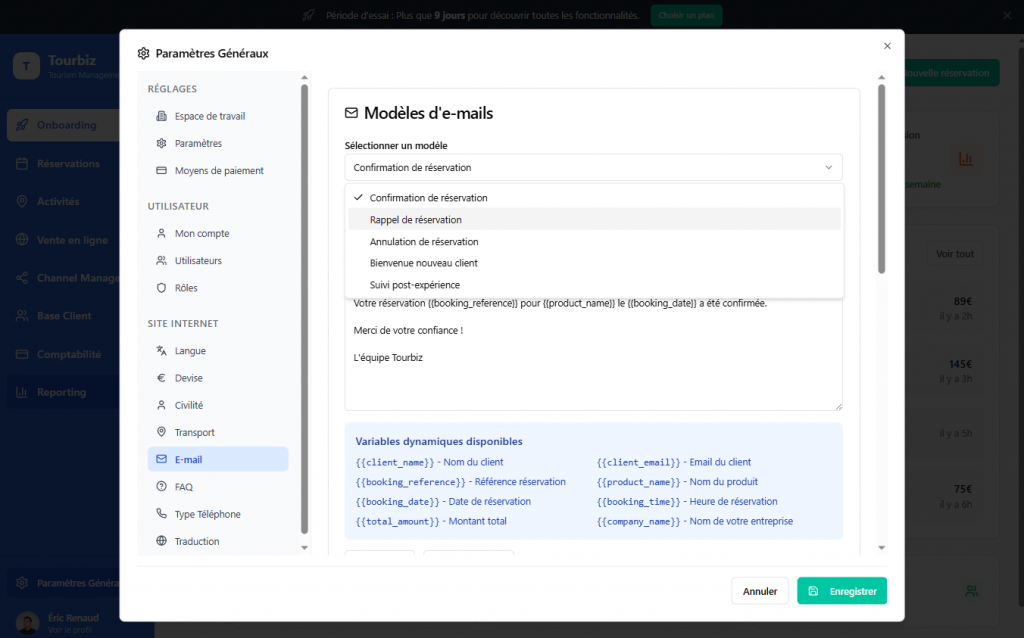
Step 1 : setting up the Tourbiz account
After your registration, a setup assistant guides you to configure your information, your tourist products, and your schedule. In a few clicks, you import your existing offers and synchronize your prices, schedules, and conditions.
- Automatic import of your activities via CSV file or direct connection to an OTA.
- Language and currency settings to sell internationally.
- Creation of detailed activity profiles : durations, meeting points, photos, cancellation policy.
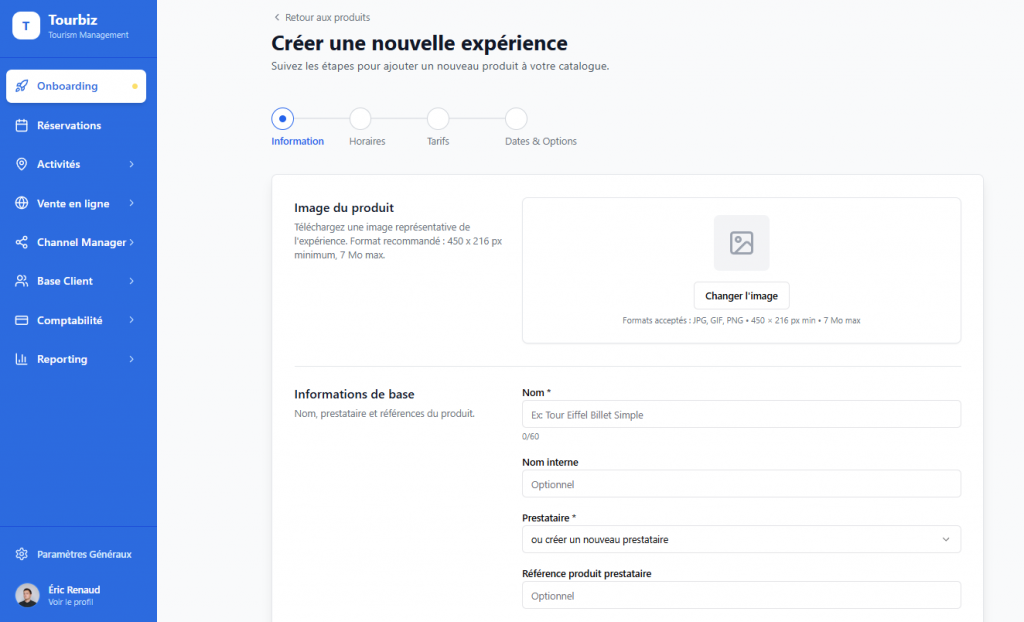
Step 2: Create your product
Once your accounts are connected, you need to add your activities in Tourbiz. If you are a small provider, you will probably only have one or a few products to add, under a single provider (you).
If you are an agency and sell many products, you will need to create as many providers and products as you have references. Tips: you can map a CSV file and easily import provider/product databases into Tourbiz.
- Bidirectional synchronization : any change to your products in Tourbiz reflects on your site.
- Secure payment management via Stripe or other integrated gateway.
- Invoice tracking and activity report available in real time.
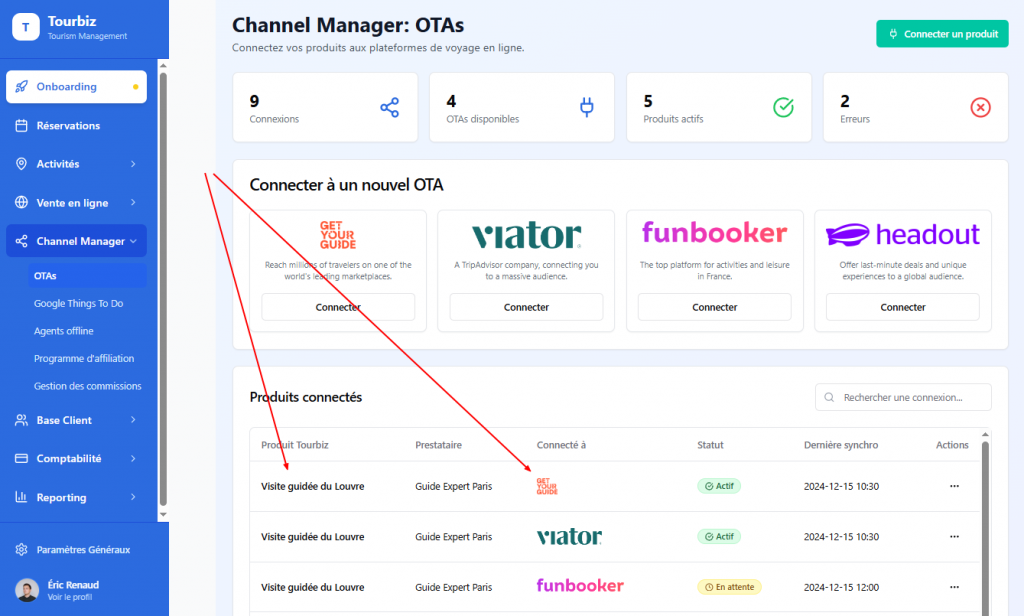
Step 3: connect your marketplaces
Once you have created or imported your products into Tourbiz, you can start connecting to OTAs to sell there!
Tourbiz integrates directly with major booking platforms. Connecting to GetYourGuide and Viator takes just a few minutes thanks to a unified interface. No more need to update multiple calendars or manage double bookings.
- A single interface to manage your stocks and availability.
- Instant updates of prices and descriptions across all platforms.
- Performance tracking by sales channel.
Why centralize everything via Tourbiz ?
The advantages are immediate :
- A considerable time saving on daily management.
- A better visibility on your sales channels and performance.
- A consistent professional image across all platforms.
Tourbiz allows you to switch from “DIY” mode to a smooth and strategic management of your business, while maintaining the flexibility inherent to freelancers.
Want to try ?
Discover the platform, test the integrations, and manage your bookings like a pro. Try Tourbiz for free to centralize your guiding activity starting today.