
Why synchronize Google Calendar with the schedules of my guides?
For a tour operator, coordinating the schedules of guides can quickly become a headache. Between last-minute changes, group bookings, and multiple sites, the risk of making a mistake is high. This is where synchronization with Google Calendar makes a difference.
The benefits of synchronization
- Time-saving: no more juggling between multiple spreadsheets. Updates are automatic and visible instantly.
- Reduction of errors: goodbye to double bookings or assignment oversights.
- Improved visibility: each guide, manager, or coordinator accesses the same information in real-time.
The problems this integration solves
- Multiple schedules: centralizing calendars avoids dispersion across different tools or Excel files.
- Oversights: each event is notified, reminded, and archived easily.
- Overlaps: you can immediately see the slots already occupied, limiting scheduling conflicts.
The impact on organization and customer satisfaction
Smooth planning means a more serene team and better-served clients. Fewer surprises, more reliability — everything that strengthens your brand image. To go further on the daily management of your field teams, check out our guide on managing the schedules of tourist guides.
What prerequisites are necessary before connecting Google Calendar?
Before starting the synchronization, a few checks can avoid many hassles. A simple but essential preparation to secure the connection and streamline information sharing.
Check access rights and accounts to use
Each guide or team member must have an active Google account. Plan for a dedicated company account for group bookings, rather than individual use.
Set sharing permissions
Access levels must be consistent: read-only for guides, full modification for coordinators, for example. This setup ensures smooth collaboration without the risk of accidentally deleting events.
Identify the guides and calendars to synchronize
List all relevant collaborators and determine which calendars will be synchronized with the platform. This will allow you to manage the load and avoid overwhelming the system.
These settings lay the foundation for a solid integration. For a more global organization and to avoid any confusion between management channels, discover our article on the channel manager guide.
How to concretely synchronize Google Calendar with my guides’ schedules?
Once the accounts and permissions are ready, it’s time for practical implementation. Synchronization is done in a few simple steps but requires diligence to ensure everything works smoothly.
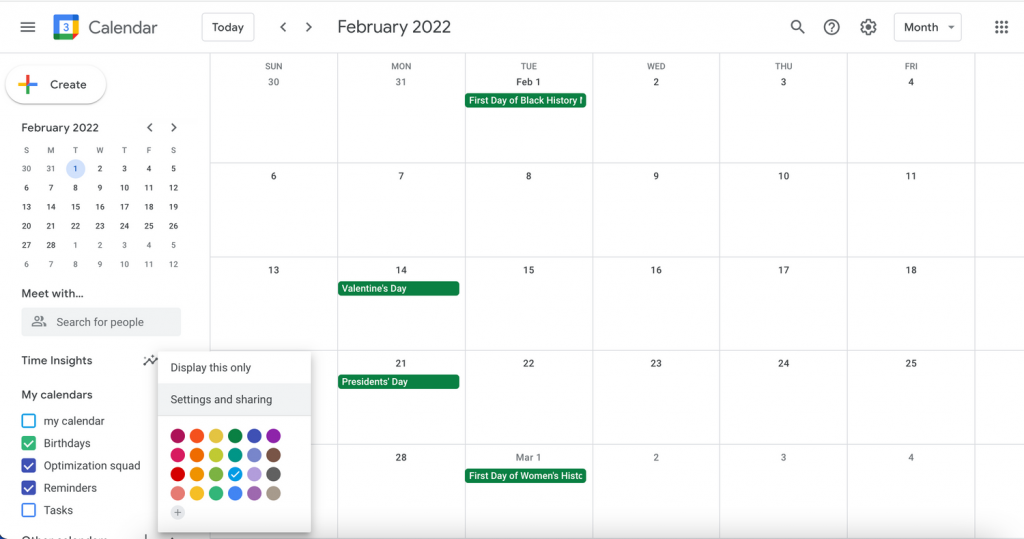
Step 1: Create a dedicated calendar for each guide
Log in to your Google account. Create a specific calendar for each guide to avoid confusion between missions. A distinct color code per guide allows for instant reading of availability.
Step 2: Activate synchronization on your platform
From your SaaS solution, open the Google Calendar integration module. Depending on your tool, this may involve a connection via API or a ready-to-use plugin. In a few clicks, your Tourbiz or external schedules will reflect in Google Calendar.
Step 3: Manage permissions and sharing
Adjust modification permissions. You can grant full access to team leaders and read-only visibility to guides. This hierarchy reduces errors and keeps planning under control.
Step 4: Test and correct
Add a few test events to check the flow in both directions. If a delay or duplicate occurs, resynchronize the calendar or check the time zones. This is key to avoiding assignment conflicts and missed appointments.
To understand how these integrations streamline tourist reservation management, consult our complete guide.
What are the best tools and practices for smooth synchronization?
Successful synchronization depends not only on technology: it relies on clear organization, reliable tools, and a trained team. Here’s how to go beyond the simple link between calendars.
Top compatible Google Calendar tools
- Zapier: perfect for connecting Google Calendar to CRMs, booking systems, or messaging platforms. Good news, we have a connection to Zapier with Tourbiz!
- Calendly: to automate appointments and avoid double slots.
- Outlook Sync: useful if some partners use Microsoft 365.
Best practices for shared planning
- Define ‘blocked’ time slots for days off or unavailability of guides.
- Create a color code and a common legend for the entire team.
- Schedule weekly reviews to check the consistency of assignments.
Automate reminders and notifications
Enable automatic notifications to prevent oversights: an email or mobile reminder avoids many ‘no-shows’. You can also connect your calendars to WhatsApp or Slack to alert your teams in real-time.
To go further on instant communication between teams and clients, discover our article on managing tourist reservations via WhatsApp.
How to manage my agenda with Tourbiz?
Tourbiz has developed its own integrated planning system, specially designed for tourism stakeholders. It allows you to see at a glance all your upcoming bookings, sorted by date, activity, or resource.
No need to go through Google Calendar or external connectors: everything is done from your Tourbiz admin space, in real-time.
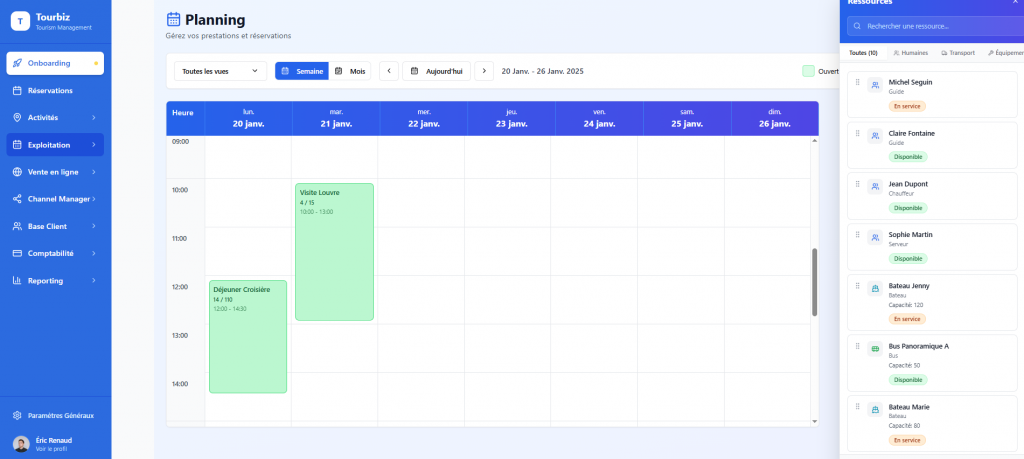
A true operational cockpit
The Tourbiz planning does not just display your bookings. You can:
- Manually create booking slots for a given activity.
- Block or open slots according to your availability.
- Associate resources with your activities:
- human resources (guides, drivers, hostesses);
- material resources (vehicles, equipment, rooms, boats).
Each slot thus becomes a complete control point, connected to your products and your team.
A smooth and collaborative operation
From the planning, you can:
- Manage communication with your staff, assign teams and track their availability.
- Supervise your activities slot by slot, or at the level of each order.
- Exchange with your clients directly from the order sheet, to confirm, adjust, or reschedule a booking.
Tourbiz centralizes everything that matters: your slots, your teams, your resources, and your clients.
The goal: simplify field coordination and reduce operational errors, even with multiple simultaneous activities.
To go further on unified management improving the oversight of your teams, consult our dedicated article on sales tracking and management in tourism.