
What is an online scheduling software?
An online schedule is a digital tool that allows you to centralize, visualize, and modify in real-time the bookings, activities, or missions of a team. For a receptive agency, a guide, or a host, it is the key to smooth organization.
Unlike Excel files or paper tables, it instantly adapts to last-minute changes. No more data entry errors and cross-calls to check availability: everything is synchronized among team members.
Paper or Excel schedules quickly show their limits:
- Lack of real-time updates
- High risk of errors or double bookings
- Difficulty collaborating among several people
An online schedule, on the other hand, brings several concrete benefits:
- Time saving on planning and updating
- Complete visibility on availability and activities
- Smooth coordination of teams, even remotely
To go further on preventing multiple bookings, check out our article on double-booking.
What criteria should be considered before choosing an online scheduling management tool?
The right tool will depend on your needs, but certain criteria are essential for all tourism professionals.
1. Ease of use and accessibility
A good tool must be intuitive. The goal: for the team to adopt the solution without complex training. Clear interface, quick navigation, access on all devices… these are key points.
2. Essential features
An effective planning tool offers at least:
- Real-time synchronization among team members
- Automatic notifications on changes or cancellations
- Instant sharing of schedules with partners and providers
3. Mobile compatibility and third-party integrations
Tourism professionals often work on the ground. A smooth mobile application and integrations with major sales channels (GetYourGuide, Viator, etc.) are therefore essential. To understand how these tools connect to distribution platforms, check out our guide on channel managers.
4. Data security and storage
Finally, do not neglect security. Ensure that your solution offers reliable hosting, automatic backup, and GDPR-compliant management to protect your data and that of your clients.
What free tools allow for effective online scheduling management?
Good news: there are several free or freemium solutions today that can cover the essential needs of a tourism professional. The important thing is to choose a tool suited to the size of your team and your business model.
Comparison of the best free tools
- Tourbiz : thanks to our freemium plan, you can create your activities that will be automatically linked to your schedule, in Tourbiz. You can then assign resources to your schedule. Everything is free! You only start paying a commission when you receive orders.
- Google Calendar: ideal for small structures. Easy to share and synchronize, it is accessible on all devices. Its limits: no specific team planning view and few advanced functions.
- Trello: perfect for visualizing tasks and missions in the form of boards. Less useful for high-volume bookings.
- Asana or Notion: flexible alternatives for organizing complex or collaborative schedules, but which require a minimum of initial configuration.
Advantages and disadvantages according to your needs
- For travel agencies: look for synchronization between the sales team and external providers.
- For independent guides: prioritize simplicity and quick mobile access.
- For hosts: focus on compatibility with your distribution channels and your booking calendar.
Use cases in tourism
A guide working with platforms like Viator or GetYourGuide can, for example, link their bookings via a centralized calendar to avoid overlapping activities. A receptive agency can assign each guide to a group or a tour with one click from a shared board.
To delve deeper into scheduling management by profession, check out our dedicated article on managing schedules for tourist guides.
How to set up a smooth organization with an online schedule?
Having a tool is good. Using it optimally is even better. A good organization relies on three levers: method, consistency, and the involvement of your teams.
Practical steps to digitize your schedules
- Audit: identify recurring tasks and friction points in your current management.
- Choice of tool: select a solution that integrates with your existing systems (reservations, CRM, distribution).
- Implementation: define access rights, create your first activity sheets, import current schedules.
Best practices to avoid duplicates and errors
- Adopt a single common platform to limit parallel files.
- Activate automatic alerts in case of modification or cancellation.
- Systematically synchronize your schedule with your sales tools.
Online booking tools like managing your tourism bookings will help you centralize and automate these flows while reducing the risk of human error.
Involve your teams and partners
Finally, involve your collaborators from the deployment. Explain the concrete benefits (time saving, visibility, responsiveness) and plan a short support to facilitate the onboarding. External partners will also appreciate clear visibility on availability and up-to-date schedules.
In summary, fluidity depends not only on the chosen technology but especially on the consistency of use on a daily basis.
How to manage and synchronize your schedules via Tourbiz?
With Tourbiz, schedule management becomes not only simple but also completely connected to your professional ecosystem. Whether you are a small local agency, an independent guide, or a tour operator present on multiple platforms, Tourbiz centralizes all your activities in one dashboard.
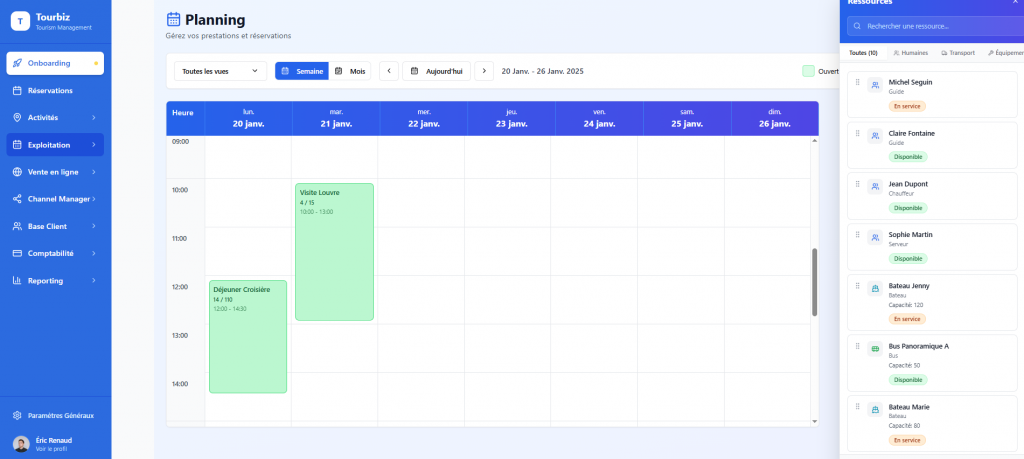
Presentation of Tourbiz scheduling features
The scheduling module of Tourbiz has been designed to meet the concrete needs of tourism stakeholders. It allows you to:
- Visualize in real-time all your bookings, activities, and resources (guides, vehicles, accommodations).
- Avoid duplicates thanks to automatic synchronization with your various distribution channels.
- Manage your teams by assigning missions and slots according to availability.
- Modulate your schedule by day, week, or month, according to your work rhythm.
The goal: smooth management, without spreadsheets or multiple scattered tools.
Integration with platforms like GetYourGuide
One of the major advantages of Tourbiz is its native compatibility with the main OTAs on the market, including GetYourGuide, Viator, or Google Things to Do. This integration allows:
- An automatic update of availability on all your platforms.
- A centralization of customer bookings in a single calendar.
- A drastic reduction of data entry errors or duplicate activities.
To better understand how to leverage this interconnection, check out our complete guide on connecting to getyourguide.
Quick tutorial to connect your tools to Tourbiz
Here’s how to synchronize your schedules in a few minutes:
- 1. Connect your seller accounts (GetYourGuide, Viator, your website, etc.) from the Tourbiz dashboard.
- 2. Import your existing activities and availability. Tourbiz automatically detects matches.
- 3. Activate bidirectional synchronization so that any booking or cancellation is immediately updated.
- 4. Customize your schedule view: by activity, guide, location, or sales channel.
Once the setup is complete, Tourbiz becomes your command center: every modification made from your account or an external platform is instantly visible across all your channels.